

Replace your TV speakers with something worth listening to.
As TVs have become thinner and thinner, the already sub-par sound spewing forth from their speakers has grown worse and worse. As such, sound bars – those wide, bar-like speakers that sit below your TV – have risen in popularity.
However, while most are fine for movies and TV, the lounge room is often a hub for all forms of entertainment – including music. So, how do these bars stack up when it comes to chilling on your couch and indulging in your fave tunes? Let’s find out.
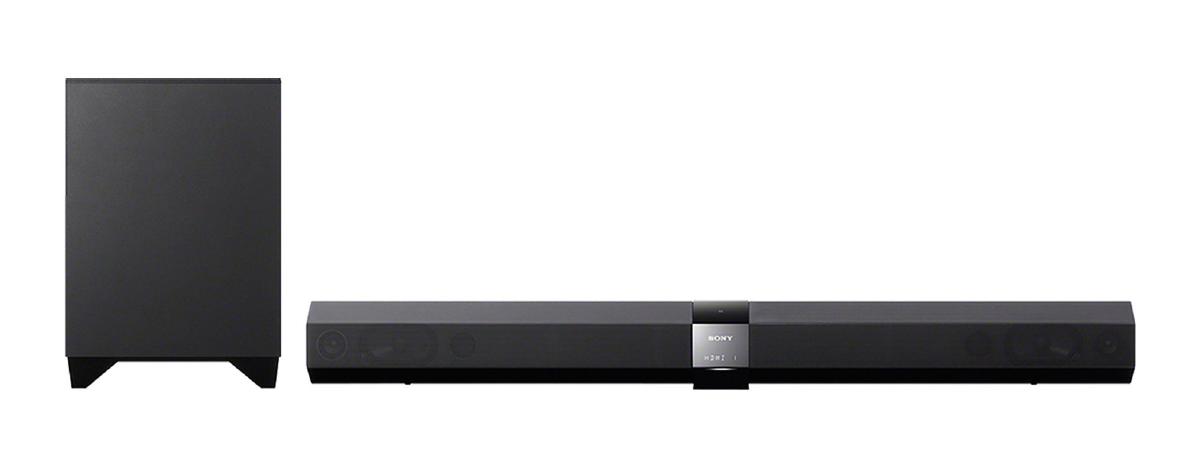
Sony HT-CT660 #
Feature rich, with sound besting more expensive units.
Score: 4.5 | Price: $550 | Online: www.sony.com.au/product/ht-ct660
Critical specs: Wireless subwoofer, 100W RMS x2 + 120W RMS sub, Inputs: 3x HDMI inputs + 1x output, 1x 3.5mm, Bluetooth with NFC, wall mountable.
The Sony HT-CT660 is my pick of the lot, as it offers features and sound quality that rival the most expensive units, yet costs hundreds of dollars less.
With the exclusion of the Sonos’ superb music streaming features, this sound bar has it all – multiple inputs (3x HDMI in + 1 HDMI out, 1x optical, 1x 3.5m – coaxial is notably missing, so make sure you don’t need it), Bluetooth support for connecting your smartphone or tablet, and a dimmable display.
The bar also includes your choice of 9 equaliser settings (STD, Movie, Drama, News, Sports, Game, Music, P. Audio, and Stereo), which – if you have a Sony Bravia TV – can be automatically activated based on the show you are watching, or source you’re listening to.
Most importantly, it sounds great. I preferred to turn the sub down a little bit, as it would otherwise overtake the rest of the music, and I used the ‘P. Audio’ equaliser setting, as all the others seemed to add atmospheric echo effects.
The industrial design, while not offensive, is where the costs were likely cut. This isn’t to say that it’s poorly built or ugly, it just lacks some of the more premium-feeling finishes, like the Sonos’ heft, or the Samsung’s stroke-able metal grille. And, I maintain that NFC-based Bluetooth pairing is silly.
Philips Fidelio HTL9100 #
Wireless detachable speakers convert to surround when needed.
Score: 4.5 | Price: $999 | Online: www.philips.com.au/c/home-theater-systems/soundbar-htl9100_79/prd/
Critical specs: Wireless subwoofer + detachable wireless rear speakers, 120W RMS x4 + 90W RMS Sub, Inputs: 2x HDMI + 1x HDMI audio return channel (ARC), 1x optical, 1x coaxial, 1x 3.5mm, Bluetooth, wall mountable.
This sound bar’s stand out feature is that it can quickly, easily, and wirelessly convert to a surround sound system, by removing the battery-operated magnetised ends of the sound bar and placing them somewhere behind you.
This is a stroke of genius as it removes the wires trailing across your lounge room, and saves you having to find permanent, out-of-the-way positions for what are often ugly rear speakers (although you will have to find somewhere convenient and aurally effective to place them), greatly improving this product’s WAF (Wife Approval Factor).
Thankfully, it also sounds great – providing a rich, full-bodied sound that makes listening to music a pleasure.
The wireless speakers will last 10 hours, and are recharged when reconnected to the sound bar. Additionally, the tall subwoofer has a small footprint, making it a little easier to fit in amongst the furniture in smaller rooms.
Additionally, it features every input that you could possibly want, as well as Bluetooth audio.
Rather cheekily, the box advertises that the sound bar is compatible with several online streaming services, when, in reality, you just stream those services to the unit from your smartphone via Bluetooth.
Sonos Playbar #
Unparalleled music streaming, great design, but really expensive.
Score: 4 | Price: $1099 | Online: www.sonos.com/introducing/playbar
Critical specs: 9x amplified speakers, 1x optical input, Wi-Fi or Ethernet for wireless music streaming via Sonos software or internet, wall mountable.
The Sonos is different from other sound bars, as it comes from a product lineage designed around music streaming – that is, playing music stored on your computer, or from any of the many sources available online – with easy control from your smartphone or tablet. With this in mind, it should come as no surprise that this sound bar was amongst the very best in terms of musicality.
It also has my favourite design aesthetic, with a notable heft that screams quality, and a flat discrete profile that I find very appealing. Additionally, it solves a common problem with sound bars – that they run the risk of blocking commands from your remote control – by adding in a rear-facing infrared repeater, which passes on your remote’s commands.
It is, however, at the top end of the price point. Laughably, the manual suggests adding in the wireless subwoofer (an additional $1099), as well as two Play:3 speakers as rears ($479 each), taking the total cost of this 5.1 system to a mind-bending $3156. Needless to say, for this price you could buy three of the Philips surround units for around the house, and stream your music or internet sources to them via Bluetooth.
Samsung HW-F751 #
Questionable addition of vacuum tubes adds to cost.
Score: 3 | Price: $799 | Online: www.samsung.com/au/consumer/tv-audio-video/sound-bar/sound-bar/HW-F751/XY
Critical specs: Wireless subwoofer, 310W RMS total, Inputs: 1x HDMI in, 1x HDMI ARC, 1x optical, 1x 3.5mm, Bluetooth, USB (for flash drives only), sound calibration via included mic, wall mountable.
I really like the look of this sound bar. In fact, I also really like the feel of it. That dark metal grille feels incredible, and I found myself stroking it for far longer than I perhaps should have. I also really like that the display sits behind it – so it can’t be seen when it’s not in use, and, when it does light up, it looks speckled. I even like the look of the vacuum tubes sitting on the front/top of the unit (depending on how you have it oriented).
But this begs the question: why on earth does it have vacuum tubes? I’ll tell you why: as a gimmick. There are people out there that believe that vacuum tubes – the original form of amplification, required before we invented transistors and semiconductors – sound warmer. The term ‘warmer’, as used by audiophiles, is akin to an engineer using the term ‘distorted.’ Sure, if you like that sound, go get yourself a vacuum tube amp – but don’t think that sticking a vacuum tube in a digital product – especially a sub-$1000 product with built in, tiny speakers – is going to do anything beyond increasing the manufacturing and maintenance costs.
I found the sound to be only a little behind the Sony (which puts it further behind the Sonos and Philips), but only after using the included microphone to set it up properly. Before this it was – ironically, given the vacuum tubes – too bright and sharp.
It’s not a bad product – far from it – it’s just that the vacuum tubes make it cost more than it should.
Sharp HT-SB60 #
Good price, but trumped by Sony in both features and sound.
Score: 2.5 | Price: $450 | Online: www.sharp.net.au/product-catalogue/products/HTSB60/
Critical specs: Wireless subwoofer, 80W x2 RMS + 150W sub, inputs: 2x HDMI in + 1x HDMI ARC, 1x optical, 1x 3.5mm, wall mountable, designed for 60" TVs.
The Sharp features at the lowest price point in the round-up – and it feels that way. The bar is lightweight, the remote control flimsy, cheap and poorly designed. It isn’t the worst sounding of the bunch (that would be the LG), but it doesn’t sound great. Like all these sound bars, it does fine for movies, but if you’re looking for a nuanced listen to some of your favourite tunes in the comfort of your lounge room, your money is best spent elsewhere.
While the extra $100 between it and the Sony translates to 20% of the purchase price, the Sony’s step up in sound quality is noticeable, and its further addition of Bluetooth makes the extra investment seem like a no-brainer.
One standout feature is that the Sharp goes really, really, ear-splittingly loud – but you’ll find that the small subwoofer will begin to distort long before maximum volume is reached. Still, if you’re looking to party – and willing to turn the sub down a bit – this will take you to shouting-across-the-dancefloor levels.
LG NB5530A #
Questionable RRP for such an unbalanced sound.
Score: 2.5 | Price: $749 | Online: www.lg.com/au/home-audio/lg-NB5530A
Critical specs: Wireless subwoofer, 40w RMS x2 + 120W RMS sub, 1x optical, Bluetooth, wall mountable.
Being the third most expensive sound bar that I tested, it would be fair to expect that the sound quality would be a standout feature. Unfortunately, this is not the case. The speakers are shrill, and the subwoofer adds only booming bass at the bottom end – leaving the midranges completely empty, and highlighting the physical separation of the two components. At $749, it kinda feels like you’re buying a whole new TV, only without the actual TV – just its tiny, tinny speakers bundled with an uncomplimentary subwoofer.
And, to limit the utility of the device further, it only includes an optical input (no HDMI). It does, however, include Bluetooth – but at this price point, that should be standard.
Overall, I found that none of the bars reviewed could rival my current hi-fi (a big amp paired with tower speakers), which I paid around $900 for, excluding sources. This is something to keep in mind when considering a sound bar; with the exception of the Sony, you really need to pay around $1000 for great musical sound quality. If you have a discerning ear, then I believe you’re still best off forking out for a component hi-fi system.
Setting it up
There are a few considerations to make when setting up your sound bar:
Will it sit directly below the TV? If placing it in front of the TV, make sure it doesn’t obscure the remote control sensor, unless (like the Sonos Playbar) it has a repeater built-in.
Will it have to be wall mounted? Almost every sound bar out there is wall mountable, and most reviewed here even included all the brackets and templates needed to mount it, too.
Where will the subwoofer go? The location of your subwoofer has a big effect on the overall sound. Thankfully, each of these units (with the exception of the Sonos Playbar) included a wireless subwoofer, making it easier to place (as long as it’s near a power point). The worst place to put your subwoofer is the centre of the room. Bass will become stronger the closer the subwoofer gets to a wall, with the loudest place being in the corner. However, the way the sound waves bounce around your room will also affect the sound quality, and can make it sound too boomy, or weak. Experimenting with subwoofer placement can minimise this effect.
The best way to find the sweet spot in your room is to place the subwoofer where you would normally sit when watching a movie (so you’ll probably have to move the couch), then crawl around the room, listening for the place where the bass sounds best (start in the corners). Once you’ve found that spot, mark it, and move the subwoofer there. Presto.
Syncing your audio
When watching movies through your sound bar, you may just notice that the lips aren’t moving in sync with the sound. Thankfully, just about every sound bar on the market allows you to adjust the delay, so that you can make sure they sync up again. Many have the option directly on the remotes, so it’s just a matter of pressing the right buttons, while others have it hidden in a menu. Consult your manual to find out how to fix this annoying problem.