

Sweep away those traces that you left behind online.
Have you ever Googled yourself? We all know that a pile of information about us exists online, but it never really becomes clear until you put your name or online handle into a search engine. Looking for something a little freakier? Try a Google image search.
A digital footprint is an inevitable side-effect of your life online — pretty much everything you do online is stored somewhere. The trail that makes up your digital footprint consists of data that you’ve willingly put online; data about you that someone else has put online; data not available online that you’ve created; and data not available online that has been created about you. This last type of offline data has been referred to as a digital shadow, rather than footprint, as you don’t necessarily create it directly, and it’s pretty much unavoidable. Your digital shadow can include medical records, travel itineraries, browsing history, security camera footage, bank records, info taken from smartphone apps, etc.
This information often stays siloed on the server that it is created on, but will likely be used — or made available to third parties — for the nefarious task of marketing. And, just because this information isn’t available on the internet, doesn’t mean that it isn’t at risk of public exposure — look at the Anonymous hack on the PlayStation Network in 2011 for a high-profile example that involved the collection and distribution of 77 million accounts, including email addresses and hashed passwords. Unfortunately, you have very little, if any, control over the size of your digital shadow, and the companies storing this information are rarely held accountable if it is breached.
And your smartphone is just as guilty — it’s common practice for many iOS apps (and, probably Android apps, although they require permission at install) to upload your entire address book to their servers — meaning that you can almost guarantee that your name, email address and/or phone number are sitting on a server somewhere, thanks to a friend installing a dodgy app on their phone. VentureBeat have a story on the practice that’s well worth reading.
There is clearly a heap of information available about you, both online and off, but why should we be fearful? A big concern is identity theft — where someone can gain enough information to convince, say, a financial institution that they are you, then get up to no good. Even though it’s usually phishing scams or data breaches of private servers that are responsible for this, you should still be aware that the small, seemingly disparate, pieces of information scattered around the ’net can be joined together to form a fairly comprehensive picture of your life.
Feeling suitably paranoid? Now is probably a good time then to start thinking about the information that you do have control over.
An embarrassing past #
Beyond identity theft, there are some genuine reasons to want to cover up your digital footprints — especially if they represent a part of your rebellious, naïve youth that you no longer agree with. For example, you may be starting a new career as a public figure, or even going on a blind date.
Now, I’m presuming that you’ve already Googled your name in quotes, and found something that you’re not too happy about. If it was beyond the first two pages of results, it’s probably pretty safe from most eyes, but if not, or if you don’t want to take the risk of there being someone determined to find some dirt, you’ll want to take some action.
Unfortunately for you, you can’t remove results from Google (or other search engines) directly. All you can do is make them less relevant, and eventually, they’ll drop off into the oblivion that lies beyond page 5. The best way to make them less relevant is to remove the source page (in this case, they’ll probably drop out of Google results completely).
The first port of call should be to remove any content that you own — that means shutting down and deleting those old, angst-ridden LiveJournal (or other) accounts gaining dust in that obscure part of the web.
Additionally, on Facebook, you can untag yourself from any unsavoury images, or request the person remove the photo completely. This is a simple task (although, up to the discretion of the photo uploader), achieved by opening the photo in question, clicking on ‘Options’ then ‘Report’ and checking the “I want to untag myself” option (or the “I want this photo removed from Facebook” option, if it’s particularly unflattering).
Other websites can be tricky — if it’s a (erroneous, I’m sure) bad review of your business, or some other negative content created by someone else, it’s rather unlikely that they’ll be willing to remove it. But, if you feel that there is a legitimate reason for its removal, you might as well reach out to the webmaster (politely) requesting its removal.
This isn’t always possible, however, as sometimes you just can’t contact the webmaster, or they refuse to take it down. What you can do in this case, and it’s probably a good thing to do, anyway, is bury these unwanted posts/photos by heavily promoting those positive parts of your online persona — current social networks like Twitter, Facebook, and LinkedIn carry more Google weight than obsolete ones like MySpace and Beebo, so make sure those accounts are squeaky clean — or else change the names tied to your existing profiles, and start new ones.
Additionally, you can use a service like unlistmy.info [Ed: this site is now defunct, and its URL redirected, so don’t go there] to find which sites contain data about you, enabling you to request them to delete it. It is, unfortunately, US-biased, but not entirely irrelevant to us antipodeans. You can also use the people search engine, pipl.com [Ed: this site, too, is now defunct], to see what info about you exists out there — it indexes sites that are often buried by Google, so it’s a good place to find any forgotten social profiles.
Staying clean #
An embarrassing past forms only one part of your digital footprint. It’s likely that the majority of your footprint actually exists in the shadow realm (to twist the above terminology) — that is, data created about you, not necessarily by you. So, if leaving a trail of personal information across the web leaves you feeling a little uncomfortable, what can you do about it? And, just how paranoid should we be?
Paranoia level 1: Trim the fat #
You can get an overview of just how much of your information is leaking out online, as well as help on how to plug those holes, by visiting privacyfix.com/start [Ed: also defunct] and installing the browser plugin. The plugin will not only give you a rather comprehensive overview of your data, but will also block any tracking data across websites, and give you a few tools to help improve your privacy as your browse. It’s still up to you, however, to lock down your social networks.
To do this on Facebook, visit settings, then the ‘Privacy’ and ‘Timeline and Tagging’ sections on the left, and set all that you can to ‘Friends’ rather than ‘Friends of Friends’ or ‘Everyone.’ Additionally, change the ‘Do you want other search engines to link to your profile?’ to ‘Off,’ as well as limit your past posts.
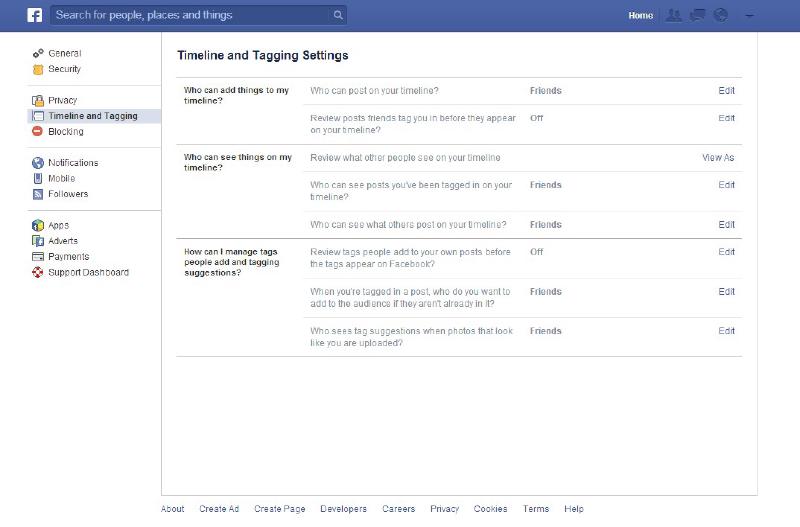
You should also consider a Facebook alias — this way, people can only find you if they have your email address, or you let them know your alias. You can also go one step further, and strip out your personal info, like education, employment, hometown etc.
Twitter is meant to be public, so maybe reconsider why you have a Twitter profile. If you still want one, though, you can ‘protect’ your tweets, making them visible only to your followers. Do this by visiting Settings, then scroll down the Account page and check the ‘Protect my Tweets’ option. Note that previously public tweets will remain on Google or other places online, so don’t expect this to clean up a social mess.
On the dullest of social networks, LinkedIn, visit Settings, then on the Profile tab down the bottom, click on “Edit your public profile”, and — on the tree on the right — you can select just which sections you are comfortable appearing in public search results, or make it entirely private. This will, of course, severely limit the chances of you being head hunted, so take that as you will.
As I mentioned earlier, you may want to reduce the amount of personal data that exists about you, if only to limit the risk of that data being exposed by cyber-attacks on servers. This will involve deleting all your old, disused forum, email, social accounts, etc., and then contacting the site and requesting that they delete your personal data.
Of course, the very nature of a disused account means that it’s likely lost deep in long-forgotten memories. So, how do you go about systematically deleting your info from these sites?
If you have a long-standing email address, or can recall the login details of your old one, the best way to go about this is to search your emails for the terms “register” or “username”. It’s not a flawless approach, but can be quite effective — if time consuming. Remember, though, that just because you delete/deactivate your account on a site doesn’t mean that your information won’t remain on their servers; to be extra thorough, you should contact the site and request that they remove your info.
If you’re unregistering from a forum, keep in mind that any posts you made will remain online, and it’s unlikely that any moderator will be willing to delete them all. As you usually post under a handle, just make sure that that handle isn’t associated with your name on any other websites, and those posts will become moot.
And, on the services that you continue to use, you should remove your last name from any “real name” fields, and consider using different handles/aliases across the different accounts.
Once you’ve done this, you should go about making sure that you’ve swept up all the crumbs from your virtual bed. Undertake another Google search for both your name, and any handles that you’ve used — results will still likely appear, so re-run the search again in a few weeks, and see if anything new comes up that you don’t want seen. In fact, it’s not a bad idea to periodically Google yourself, and react accordingly.
Paranoia level 2: Hoarding your data #
Now, the footprints you leave behind as you traverse the digital plains are also monitored by advertising companies (not the least of all being Google). If you feel that you should have a little more ownership of this data, and keep it from the hands of the marketers, there are also a few additional steps that you should take.
To get a pretty good overview of what you can do to stop being tracked, including the settings you should change in your browser and some extensions that you should install, visit http://fixtracking.com/ [Ed: this now links to what looks like a DuckDuckGo page, but hosted at a different URL, so I wouldn’t trust it anymore]. You should also either disable cookies entirely (which can limit many website’s functionality), or set the browser to delete all cookies upon exit (which leaves cookies to be tracked only while your browser remains open).
If you’re sick of having to log back in to all your most-visited sites after deleting your cookies, and don’t mind keeping some cookies, you can install an add-on that deletes all but a select few of your cookies — meaning that you can leave your site logins in-tact. One such add-on I recommend in Firefox is Self-Destructing Cookies by Ove or, in Chrome, Vanilla Cookie Manager by Christian Zangl.
Now, you should bear in mind that deleting cookies will have the side-effect of making advertising on websites less relevant to you — the argument here is that if you’re going to see ads, anyway, wouldn’t you prefer to see relevant ones? The counter argument, of course, is that you should be running an ad-blocker, anyway. I’m in the latter camp, which is a big, hypocritical f-you to both website owners and content generators, as I am one of the latter.
Also, if you really feel strongly about your data, you should shut down all your social networking accounts — they exist purely to squeeze some dollars out of your info, after all. Not willing to sacrifice that, just yet? Why not take the anarchist’s route, and fill in your profile with erroneous data (note that this is a breach of most social network’s terms, so don’t tell ol’ Zuck).
You should also switch search engines, away from Google or Bing, as they exist, once again, to track you and show you ads. Non-tracking alternatives include duckduckgo.com, startpage.com, ixquick.com (same company as startpage but searches using more than just Google’s search engine), or enabling the Ask Eraser on Ask.com [Ed: just stick with DuckDuckGo].
Paranoia level 3: Become a phantom in the night #
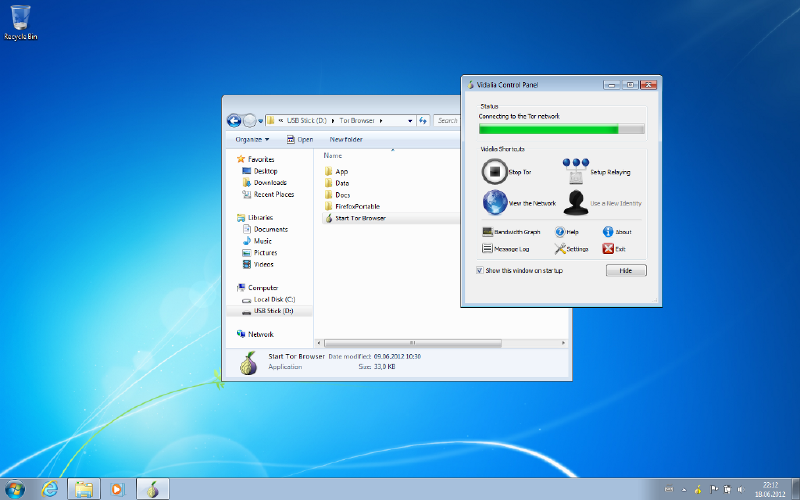
If you’ve shut down all your social networks, now run your own email server, have disabled cookies completely, but are still looking for complete anonymity, there is one option worth considering — TOR. Used by frequenters of the seedier parts of the net and privacy enthusiasts alike, TOR (The Onion Router) bounces your http/other requests through a distributed, anonymising network of servers, making it nigh on impossible to track where the request originated. Additionally, it encrypts all of your data (up to the exit of the TOR network — so still use https where possible), so that anyone viewing your packets as they skate across the icy surface of secrecy cannot actually see what they contain.
The easiest way to use the TOR network is to install the TOR Bundle, which includes a privacy-focussed modified version of the Firefox browser, and will automatically connect to TOR when opened, as well as delete all your session data when closed. You can get this bundle, ready to install to a USB drive, from https://www.torproject.org/download/.
If you feel that this is going a bit too far (although, if you’re really interested in privacy, I can’t think why), you could, alternatively, install a VPN like Tunnel Bear *[Ed: I would today recommend Private Internet Access] — which will encrypt all your traffic, and send it via a server in your country of choice (perfect for accessing country specific content, like certain American TV shows). Additionally, this is good practice if you ever use an ‘open’ WiFi network, like at most cafés, as it prevents people from being able to view your data over the unencrypted connection (there are tales of cars parked near internet cafés with laptops in the boot that do nothing but log all of the data sent through the café’s wireless network, to be sifted through later for goodies).
Paranoia level 4: Vanishing completely. #
Constantly looking over your shoulder through the eye holes in your tinfoil hat? Have you systematically and successfully deleted every internet account you ever signed up for, including hacking into and destroying the relevant pages in the Internet Archive? Been using TOR for years? Perhaps the only thing left for you to do is to buy a cave/earth ship, and leave the grid. Use only wired networks. In fact, go offline completely, and only send letters — in code. Don’t buy a smartphone, and encrypt all of your phone calls. Don’t cut your fingernails. Store your own urine. Dream of building an all-wooden aircraft 5 stories tall… Escape from the world because someone, somewhere, is watching you.
Boxout #
On passwords: To keep your online data safe from cyber-attacks, I can’t stress enough how important it is to have strong, unique passwords, not found in any dictionary, for each site you log into. Of course, remembering them all is a pain, so use a password manager to keep track of them all. I use the free, open source KeePassXC, as it has clients for just about every platform (including Windows, MacOS, Linux, Android and iOS, as well as plugins for Chrome and Firefox), and is about as full-featured as they come, including an automatic strong password generator, and support for cloud-syncing your encrypted password database.